Choose your unit
At the start of your shift, tell AMT which unit you fly and who is with you. Open Unit from home or the menu.
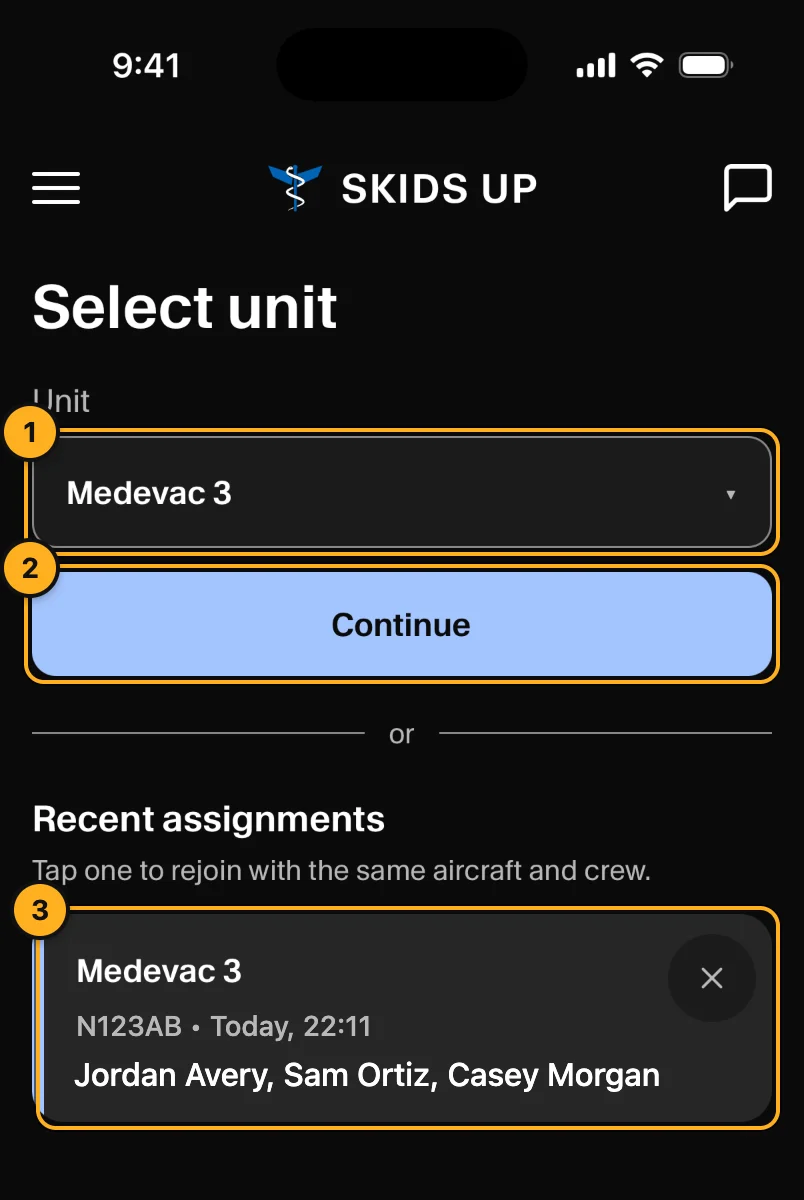
- Unit: choose the unit.
- Tap Continue. The Change assignment sheet opens (below).
- Recent assignments: tap a card to rejoin a unit with the same aircraft and crew. Tap × to remove a card.
Change assignment
You are the pilot, so there is no pilot row. Set:
- Vehicle: the aircraft.
- Medical Crew 1 and Medic 1 Phone.
- Medical Crew 2 and Medic 2 Phone.
- Mechanic and Mechanic Phone (optional).
Both medics and both medic phones are necessary. Each medic and each phone can be used one time only. Tap Submit.
Crew who are on another unit
The list shows (On Medevac 2) next to a person or phone that is on another unit. You can still choose them:
- If your company uses an AOC desk, AMT sends the change to the AOC. You see Sent to AOC for approval. You get a notification when the AOC approves or rejects it.
- Dispatchers in the console can also move crew at any time (Crew and crew phones).
Crew phones
A crew phone only chooses the unit and taps Confirm Unit. It cannot change the crew.