Chat
Chat with a unit's crew, or with the agency that requested a call, without leaving the console. Crews answer from Skids Up; agencies from Launch.
The comms dock
Your chats sit along the bottom of the screen. Each shows who it's with and the call they're on; unread chats stand out.
- Click one to open it. Open several side by side.
- New chat reopens any chat or starts one with any unit.
- Pop out comms moves all your chats to their own window.
You can also start one from a call or unit drawer with Message crew.
A chat window
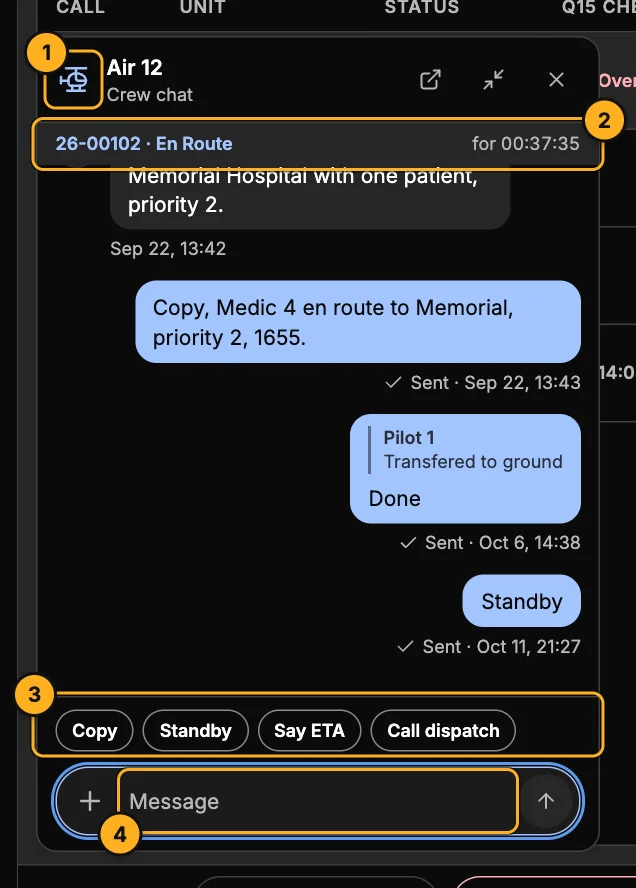
- Unit — for a crew chat, opens that unit's drawer. The chat stays open.
- Call — the call the unit is on and its status.
- Quick replies — common answers in one tap.
- Message — type and press Enter. + attaches a photo or file. You can reply to a message, @mention someone and react.
The buttons at the top pop the chat out to the comms window, minimise it to the dock, or close it.
The comms window
Pop out comms opens every chat in its own window — ideal for a second monitor. Search by unit, agency, person or call number; filter to Crews, Launch or Unread; and show One, Two, Four or Six chats at once.