Pending requests
A request is pending until it's sent to a unit. Requests from agencies using Launch, calls you save as pending, and calls whose unit was moved elsewhere all land on the Pending board on Live.
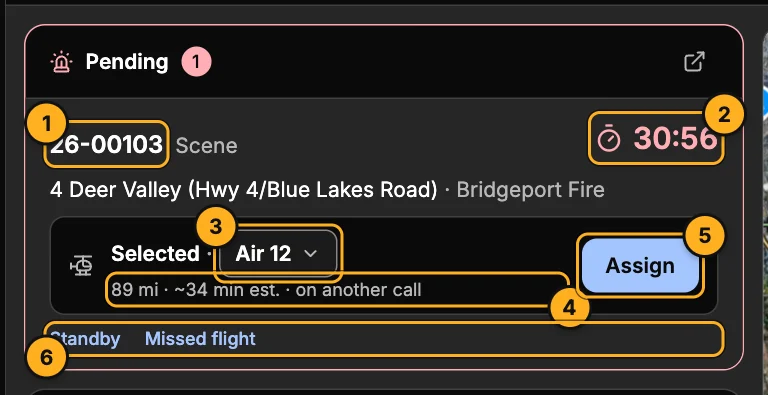
- Call number — opens the call drawer.
- Request clock — how long it has been waiting.
- Unit — the closest ready unit is picked for you. Choose another if you need to.
- Distance and ETA — straight-line miles and an estimated flight time from the unit's last position.
- Assign — sends the call to the unit. The crew is alerted in Skids Up.
- Standby and Missed flight (see below).
The request clock
The clock (and the Pending pill at the top of the screen) is plain at first, turns amber when a request reaches your company's check due time, and red at its overdue time — 15 and 20 minutes unless your company has set its own. You can see the times in Settings → Alerts and sounds.
Standby
Standby holds a unit for the call without launching it. The call moves to Standby Assigned; when the crew accepts it reads Standby Accepted, and Standby Go launches it. You can also assign it normally, or decline or cancel it, from the call's status.
Missed flight
When a request can't be flown, click Missed flight.
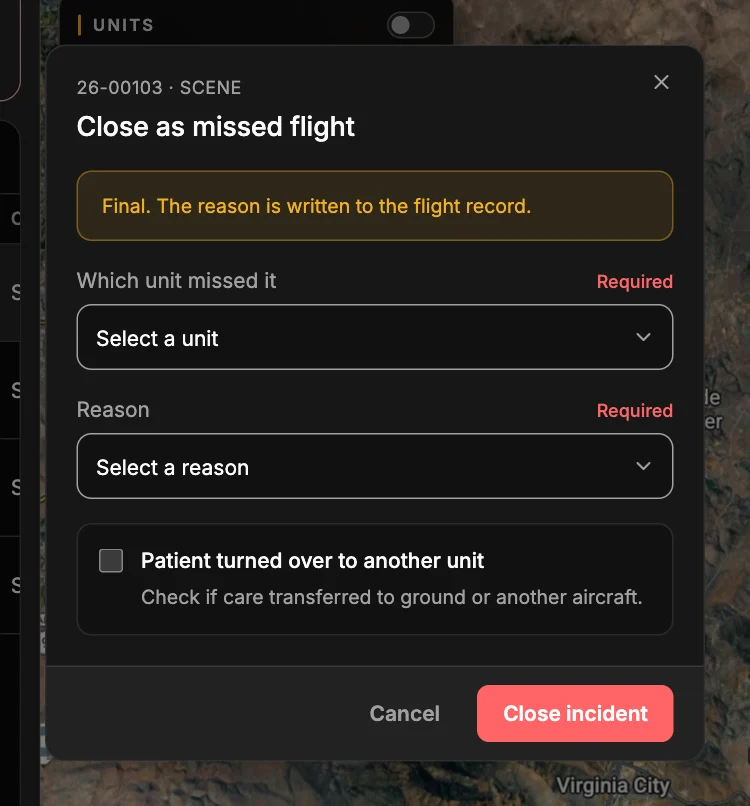
- Which unit missed it — or No unit.
- Reason — Scheduled Maintenance, Unscheduled maintenance, No pilot, No med crew, Committed, Prolonged ETA, Declined by Pilot, Declined for Duty Time, Crew Rest, or Test Incident.
- Patient turned over to another unit — tick this if care went to ground or another aircraft, and name the agency.
Close incident records it. This is final: the reason is written to the flight record.
Scheduled calls
A call created with Scheduled on waits on the Scheduled calls board until it's time. That board is hidden on Live by default — turn it on with Arrange (see Multiple monitors).