Units
The Units board on Live lists every unit — aircraft, ground units, and units out of service — with its status and how long it's been in it.
A unit on a call takes its status from the call (En Route, At Scene…); change it from the call. A unit that's free has its own status, which you can set right on the board.
Unit statuses
| Status | Means |
|---|---|
| Available | Ready to take a call. |
| 15 Minute Delay | Briefly unavailable; still in service. |
| OOS: … | Out of service, with a reason: Maintenance – Scheduled, Maintenance – Unscheduled, Not Scheduled, Decon, No Medic, No Nurse, No Provider, No Pilot, Crew Rest. |
Choosing an out-of-service status asks Why is this unit out of service? — add a short note and click Set out of service. Out-of-service time is tracked in the OOS report.
The status strip at the top of the screen counts aircraft and ground units ready and units out of service.
The unit drawer
Click a unit's name to open its drawer.
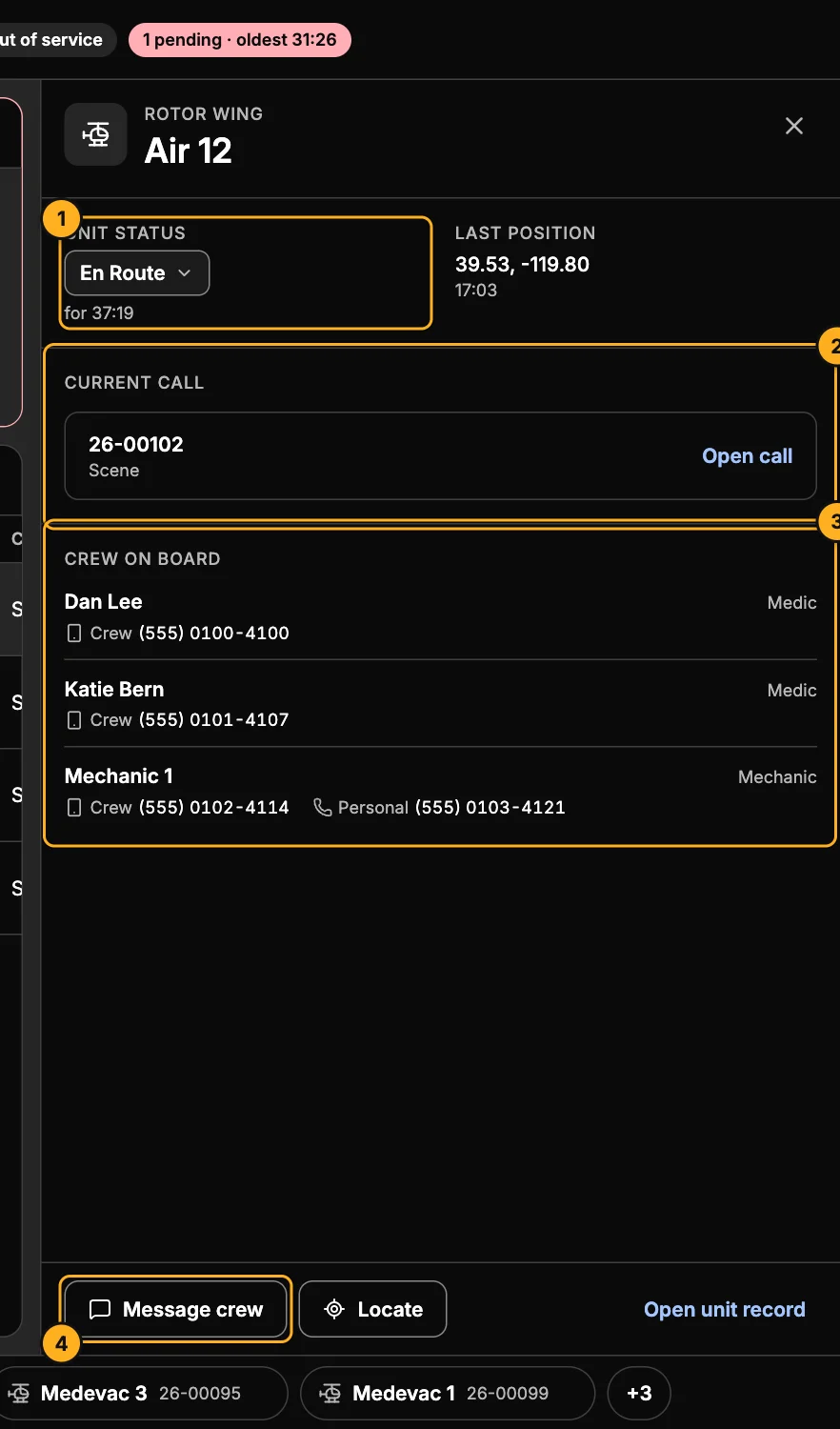
- Unit status — set it here too, and see its last known position.
- Current call — the call it's on (or the nearest waiting request it could take), with Open call.
- Crew on board — each person's name and position, the seat's crew phone and their personal phone. Tap a number to call it. See Crew and crew phones.
- Message crew opens the unit's chat. Locate shows it on the map. Open unit record edits the unit (admins).