Notifications
AMT keeps everyone on a call informed without anyone picking up a phone. This page shows who is told about what, first for your own team (internal), then for people outside your company (external), and then how alerts work in the console.
Where people are told
- Console — an alert in the console's notification center (the bell), with a sound, and the boards update on their own.
- Skids Up — a push notification on the phone, with a sound.
- Launch — a push notification in the agency's app.
- Email.
Internal — your team
Dispatch is your company admins and comm specialists. Crew is the pilot and the crew phones on the unit assigned to the call. Dispatchers who also use Skids Up get the pushes marked for dispatch on their phone.
Calls
| When | Console (dispatch) | Skids Up — crew | Skids Up — dispatch |
|---|---|---|---|
| A new call is created | ✓ alert (incident sound) | — | ✓ |
| A unit is assigned to a call | Boards update | ✓ the assigned unit (incident sound) | — |
| A call is moved to another unit | Boards update | ✓ the unit it was taken from | — |
| A call's status changes | ✓ alert | ✓ the assigned unit | ✓ |
| The landing zone or a facility on a call changes | Boards update | ✓ the assigned unit | — |
| Dispatch asks the crew to acknowledge | — | ✓ the assigned unit (high priority) | — |
| A crew member acknowledges the call | ✓ alert (incident sound) | — | — |
| A task on a call falls due | ✓ alert | — | — |
Flight following
| When | Console (dispatch) | Skids Up — crew |
|---|---|---|
| A 15-minute check is due | ✓ alert that stays until the check is logged, repeating every minute | ✓ the unit |
| A unit has been on the ground 45 minutes | ✓ alert | ✓ the unit |
| A check-in is overdue | Row turns red | ✓ the unit |
| A unit's status or weather changes | Boards update | — |
Units and crew
| When | Console (dispatch) | Skids Up |
|---|---|---|
| A pilot asks to move crew from another unit | ✓ alert that stays until handled | ✓ dispatchers on AOC duty |
| That request is approved or rejected | Updates | ✓ the pilot who asked |
| A unit's crew changes | ✓ alert | ✓ the other admins and comm specialists |
| An AOC seat or duty is handed to you | — | ✓ you |
Messages
| When | Console | Skids Up |
|---|---|---|
| A crew sends a message | ✓ message sound, in the comms dock | ✓ dispatchers on AOC duty (everyone in dispatch if no one is on AOC) |
| Dispatch sends a crew a message | — | ✓ the unit |
The sender never gets a notification of their own message. Skids Up holds back message banners while the chat is open on screen.
External — outside your company
| Who | Told about | How |
|---|---|---|
| Requesting agency (Launch) | A reply from dispatch in the call's chat | Launch push (when the app isn't open) |
| Report recipients | RAM and incident reports when a call closes (completed, cancelled, declined, missed or aborted) | Email, with the report attached |
| Someone you invite | Their invitation, and a reminder after 3 days | |
| You, when you invite someone | That the invitation expired, after 7 days |
What agencies are not sent. Agencies using Launch aren't sent call status changes, assignments or acknowledgements. They see the unit's progress and track in Launch, and they can chat with dispatch. Messages an agency sends appear in your console's comms dock.
Who gets report emails. RAM and incident reports go to your company admin, the call's crew, and everyone on your report email list. The list can include people outside your company, such as hospital partners. Reassignment reports aren't emailed.
Support messages you send from the console are emailed to your company's admins (Contact support).
The notification center
The bell at the top right of the console shows how many alerts are waiting. Click it to open the notification center.
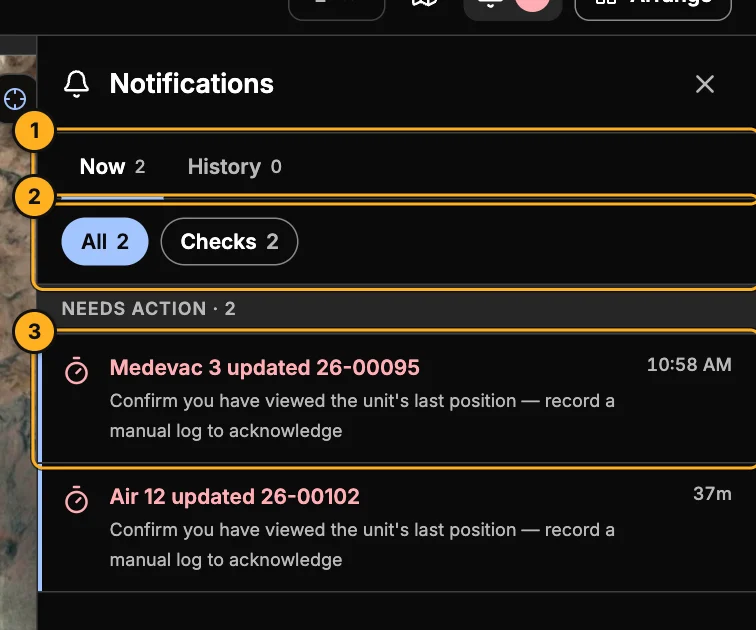
- Now and History — what needs you now, and what's already been seen.
- Filters — All, Checks (15-minute and ground-time alerts), Requests (reassignment requests), Status and Other.
- An alert — click it to go straight to the right place. A 15-minute check opens the call at its position log; a reassignment request opens the request.
Alerts under Needs action (15-minute checks and reassignment requests) stay until they're handled. Mark all read clears the routine updates; Clear history empties the History tab.
Sounds
| Where | Choose sounds for | Where to set them |
|---|---|---|
| Console | Default, Incident and Message alerts. 15-minute checks use the Default sound. | Settings → Alerts and sounds |
| Skids Up | Default, Incident and Message | The app's settings, on each phone |
| Launch | Message | The app's settings |
New calls and assignments use the Incident sound, messages use the Message sound, and everything else uses Default. Notifications can't be turned off one type at a time.